
How to Set Up SMS Opt Out in Onflo

Generic selectors
Exact matches only
Search in title
Search in content
Post Type Selectors

Customers can now opt out of SMS messaging from a district! In addition to receiving the auto-reply messaging, if set, they will also receive an opt-out instructional messaging letting them know they can opt out of SMS messaging from the district.
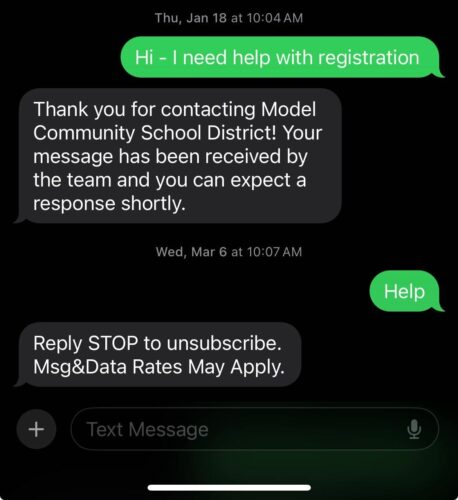
Customers can reply using any of the following keywords to opt out: cancel, end, quit, stop, stopall, OR unsubscribe. Customers can reply using any of the following keywords to resubscribe: start, unstop, OR yes.

Confirm that the customer has opted out of SMS messaging by going into the Ticket from the text conversation and hovering over the icon next to their phone number.

Related Post

Webhooks

Automatically send Onflo ticket and asset information to your other business systems. Overview Webhooks let Onflo automatically send information to another system the moment something happens. When a ticket is created or an asset is added, Onflo can instantly push

Read More ➜

API Tokens

How customers create and manage the tokens that let their software connect to the Onflo API Overview API Tokens is a feature in Onflo Settings that lets a customer generate a secure key which their own software can use to

Read More ➜

Community Promotion Toolkit

Ideas and ready-to-use templates to help you introduce or reintroduce Onflo to your community. Choose Your Approach There’s more than one way to introduce your service desk to your community. The approach you choose will depend on your district’s communication

Read More ➜