
Enable Browser-based Notifications for Incoming Calls

Generic selectors
Exact matches only
Search in title
Search in content
Post Type Selectors

Have you ever been on a browser window or tab other than Onflo (formerly Let's Talk!) and missed seeing your incoming calls? Now you can enable browser notifications for incoming calls, allowing you to respond quickly.

How to enable browser-based notifications?
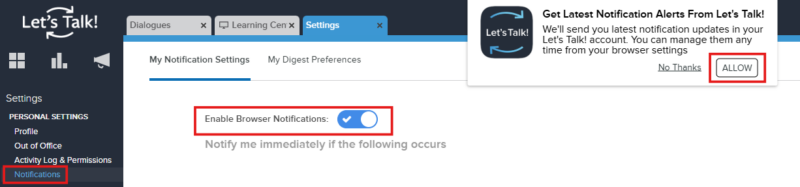
  1. Go to Settings > Notifications
  2. toggle on the "Enable Browser Notifications" option.
  3. Click "ALLOW" within the pop-up message to turn on these notifications. Don't forget to press the green Save button in the upper-right corner once you are done!

Related Post

Bulk Edit IT Assets

Build a custom list of assets by searching, pasting, or scanning — then run bulk operations on them Overview Edit Assets lets you assemble an exact list of assets without building filters. You can search for assets one at a

Read More ➜

IT Workflow Enhancements

New triggers, stop-after control, and execution sequencing for Ticket and Asset workflows Overview This release introduces three enhancements to Workflows that give you finer control over when a workflow runs and in what order. You can now target ticket creation

Read More ➜