
'Contact Us' Button for Facebook Pages

Generic selectors
Exact matches only
Search in title
Search in content
Post Type Selectors

Increase your engagement with your community through district and school Facebook pages by adding a 'Contact Us' button that links to Onflo (formerly Let's Talk)
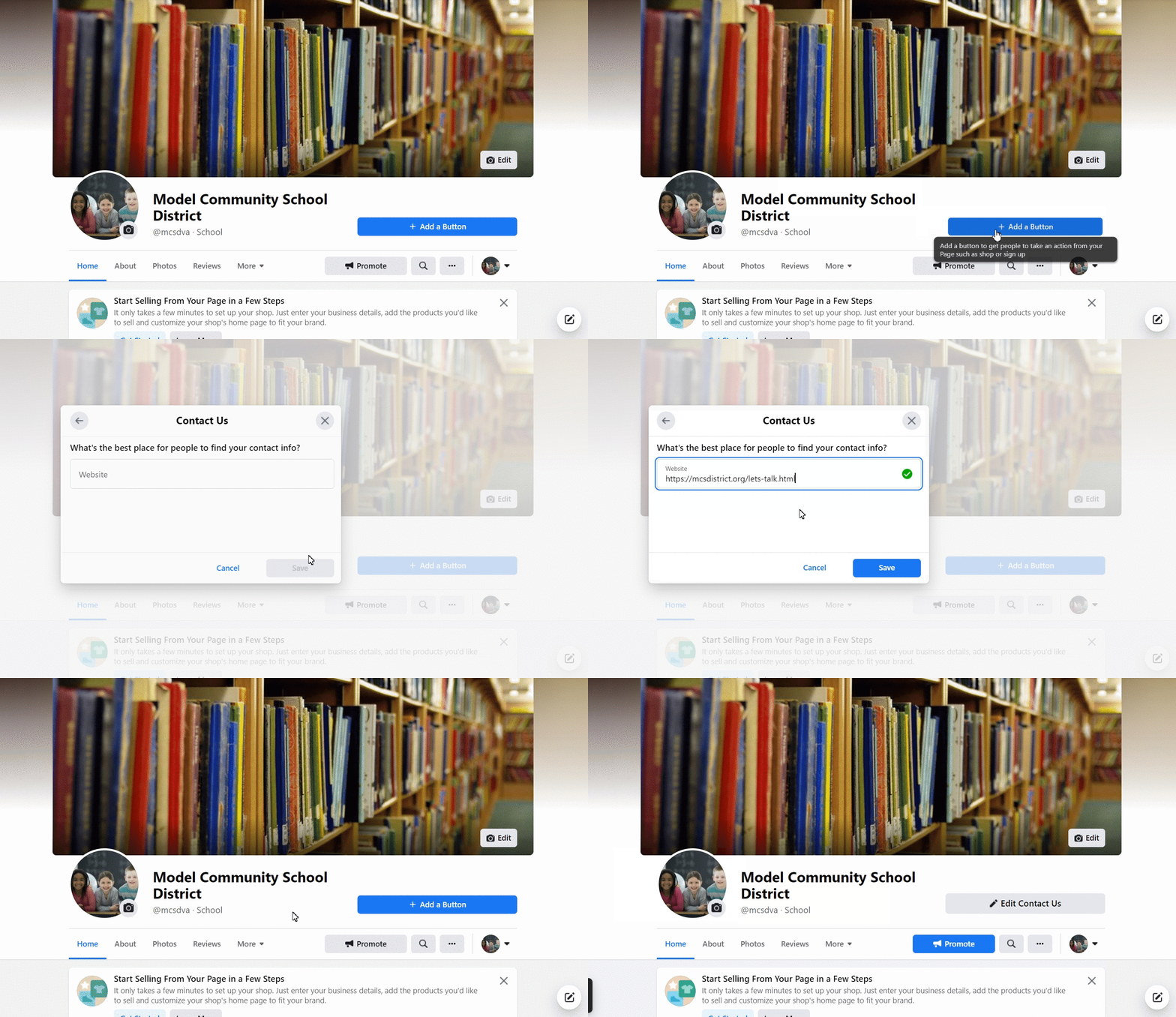
 
 
Follow these simple steps (it takes less than 2 minutes!) to make it happen:
  • Navigate to your Facebook page manager
  • Click on the blue Add a Button option
  • Select Contact Us
  • Paste the link to your Onflo landing page
  • Click Save
  • Success!

Related Post

Webhooks

Automatically send Onflo ticket and asset information to your other business systems. Overview Webhooks let Onflo automatically send information to another system the moment something happens. When a ticket is created or an asset is added, Onflo can instantly push

Read More ➜

API Tokens

How customers create and manage the tokens that let their software connect to the Onflo API Overview API Tokens is a feature in Onflo Settings that lets a customer generate a secure key which their own software can use to

Read More ➜

Community Promotion Toolkit

Ideas and ready-to-use templates to help you introduce or reintroduce Onflo to your community. Choose Your Approach There’s more than one way to introduce your service desk to your community. The approach you choose will depend on your district’s communication

Read More ➜