
Architectural foundation
A Truly Enterprise-Grade Onflo
Stronger architecture and smarter automation, built to scale with every district.
- Secure, scalable architecture
- Advanced AI and automation across depts.
- Support for complex district structures
- Better governance across districts
Tap any capability above to jump straight to its release notes.
Introducing Onflo Modules
Get Departmental Flexibility with Enterprise Governance
Overview
Historically, each department in a K-12 district had to rely on siloed tools to modernize its service delivery and operations.
Onflo Modules changes that. With this release Onflo helps you bring distinct service operations (IT, HR, Facilities, Transportation, Superintendents' Office and more) onto a unified platform, while giving each team its own purpose-built capabilities, workflows, permissions, administration, data boundaries, and operating model.
Now districts can modernize one service operation at a time, without creating silos or governance issues.
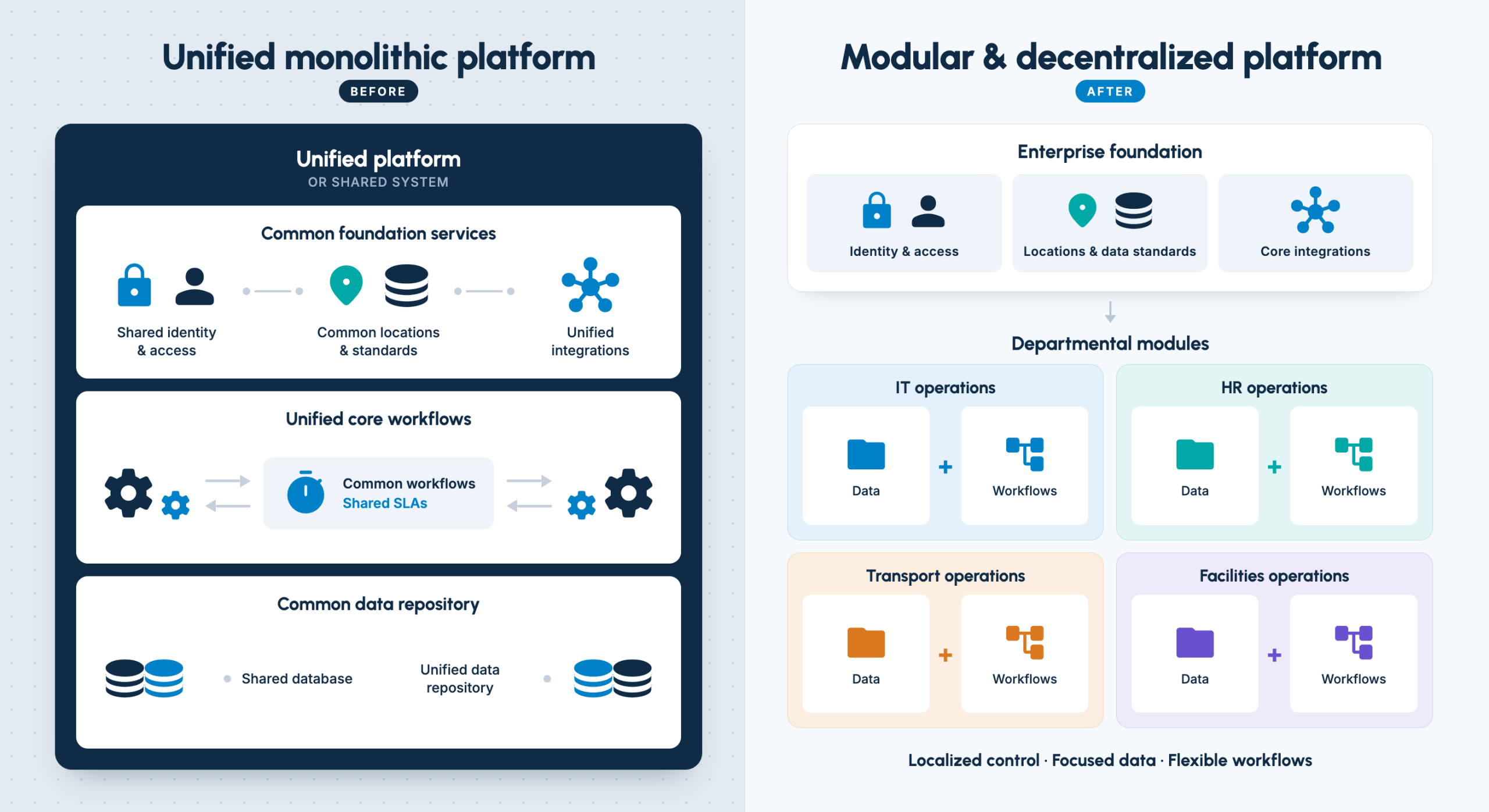
What you get with the new interface
Classic Module
Ensures continuity — your existing capabilities, data, workflows, and everything else continue as-is, with no changes.
Specialized IT Module
Purpose-built module with rich, department-specific capabilities for IT teams
Enhanced Roles & Permissions
With Agent Management, Onflo now supports platform-level and module-level administration and permissions.
What it means for your district
Maximize Platform ROI
Expand Onflo across your organization without adding another system. Modernize one department at a time and maximize the value of your existing enterprise investment.
Eliminate Tech Sprawl
Replace a patchwork of departmental tools with one connected platform. Reduce software spend, integrations, duplicate data, and the work it takes to keep everything running.
Give Every Department the Tools It Needs
Onflo is now better positioned to equip IT, HR, Facilities, and other teams with powerful, purpose-built capabilities and workflows — without forcing everyone into the same one-size-fits-all solution.
Strengthen District Governance
Centralize security, governance, and core infrastructure while giving department leaders the freedom to manage their own day-to-day operations.
Flexible for Teams. Secure by Design.
Let every department configure its own workflows, forms, queues, SLAs, dashboards, permissions, and assets, while strict data boundaries keep sensitive information protected and isolated.
What's changing
With Onflo Modules, each service operation team now gets what it needs without requiring its own disconnected point solution.
- Multiple modules within Onflo platform, including purpose-built modules and configurable modules for other district functions.
- Every Module has its own workflows, forms, queues, agents, SLAs, dashboards, permissions, assets, and configurations.
- Purpose-built functionality by Module — for instance technology asset capabilities for IT.
- Global Admin role for district-wide governance, permissions and configuration.
- Module-level administrators, so individual teams can administer their own operations without requiring the Global Admin to run everything.
- Central definition of shared enterprise information — locations, integrations, authentication, phone infrastructure, languages, and AI knowledge/training sources, with ability to delegate appropriate administrative rights to individual modules.
- Separate sensitive information between modules using role-based access, so different operations don't automatically have visibility into one another's work.
- Configurable modules, so districts aren't limited to a predetermined list of departments or organizational structures.
Centralized auditability, governance, usage visibility, and accountability while distributing operational administration.
Getting ready
For non-IT departments
Everything continues as it is within the Classic Module. Your existing data, workflows, capabilities, and SLAs will not be impacted by this change.
For IT departments
Your IT data, workflow, capabilities, SLAs and everything else will now be placed inside the IT Module. The change will happen automatically and no action is needed at your end. This includes both ITSM and IT Asset Management capabilities.
FAQ
Core Concept & Flexibility
- What are Onflo Modules? Independently configurable workspaces for district departments — IT, HR, Facilities, and more — that live on one unified enterprise platform, so each team can operate the way it needs to without creating disconnected technology silos.
- Does every department have to work the same way? No. Each Module can have its own customized workflows, forms, queues, SLAs, permissions, and dashboards.
- Can we create custom modules for non-traditional departments? Yes. Districts can create modules for other organizational functions beyond the standard list.
Platform Governance & Consolidation
- How do modules balance departmental autonomy with district-wide security? Onflo separates daily operational administration from enterprise governance. Departments manage their own processes, while the district centrally governs core infrastructure — identity, security, enterprise integrations. Granular role-based access control keeps sensitive data restricted.
- Can Onflo Modules help consolidate point solutions? Yes. Instead of procuring and maintaining separate systems for IT tickets, maintenance work orders, and HR requests, districts can bring all of it onto one platform — drastically reducing tech sprawl.
- Does the entire district have to transition at once? No. Districts can adopt a phased approach, modernizing one department at a time based on readiness and priority.
The User Experience & K-12 Focus
- Why choose Onflo over general-purpose enterprise platforms? Onflo is purpose-built for K-12 operations. It inherently understands school data structures and comes pre-integrated with systems like SIS, HRIS, and MDM — saving districts from heavy custom configuration.
Agent Management — Meet the New Global Administrator
Overview
As Onflo becomes a modular platform with Onflo Modules, districts need more than basic user management — they need real governance across every module they use. Agent Management is our answer: a purpose-built upgrade that gives your help desk and fulfiller teams fine-grained, role-based control. The right people get exactly the access they need, so your team can spend less time managing permissions and more time serving students, staff, and families.
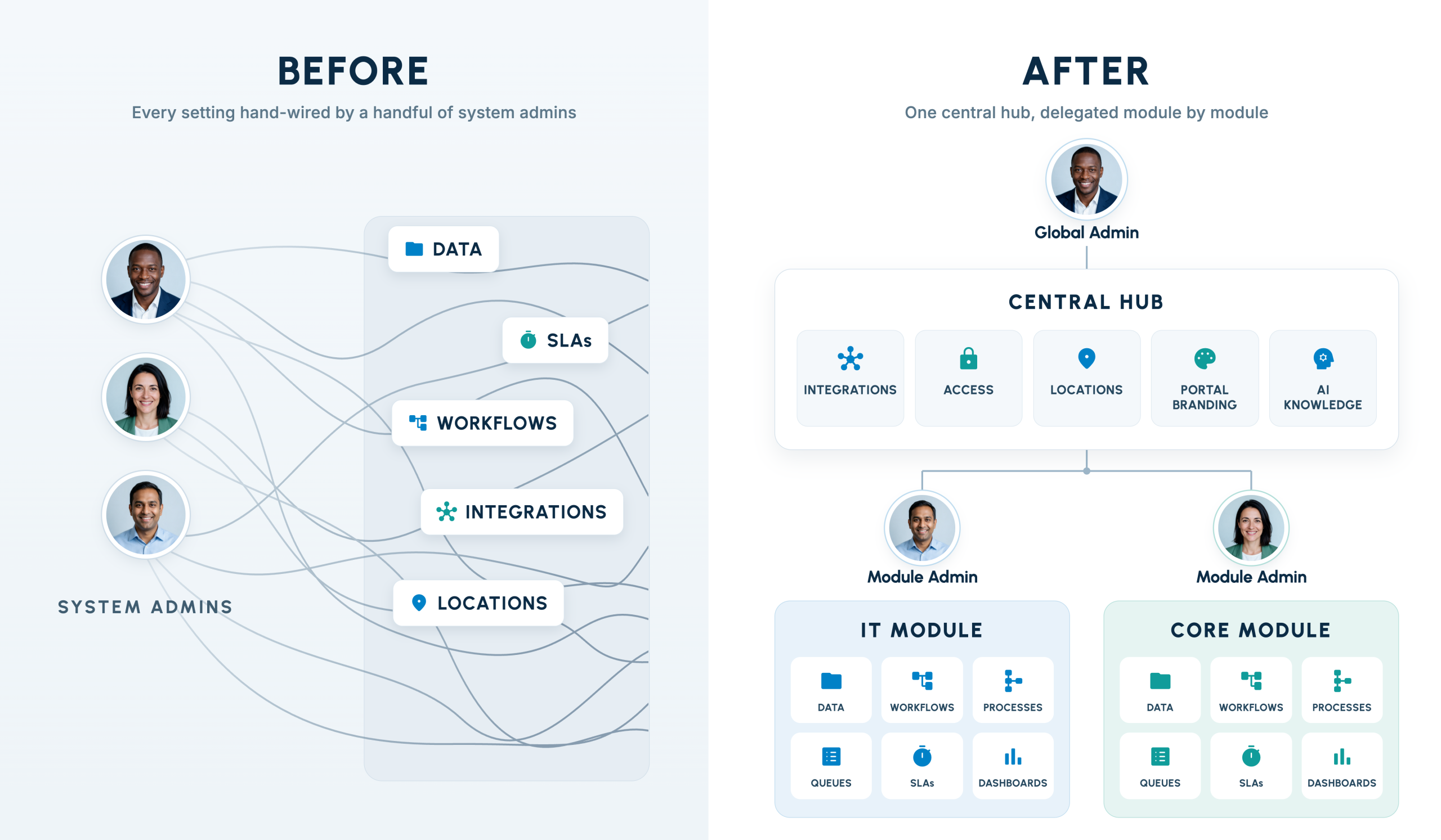
What you get with the new interface
Global Admin
A new role built for stronger IT governance across your entire platform.
Central Listing
One home for everyone who works in Onflo, organized into four tabs: Agents, Teams, Permission Sets, and Authentication.
Role-Based Control
Administration now works on two clear levels — Global Admins run the district, Module Admins run their module.
Continuity, Guaranteed
Every existing permission carries forward automatically. No one loses access to the work they already do.
What's changing
Agent Management (formerly User Management)
- A full agent profile page brings details, permissions, and activity together in one place.
- A Permission Sets column replaces Roles, giving you a clearer, more flexible way to see who can do what.
- You can create and edit your own teams. Teams synced from an integration stay read-only, so there's never a sync conflict.
- "Agent" replaces "User" throughout Onflo — a user is now simply the person submitting a request, which keeps the language clear for everyone on your team.
Permissions, refined
- Every permission now lives clearly at the district level or the module level — no more guessing who controls what.
- A new Module Admin set gives someone full control of a single module.
- Permission sets belong to a module, so each module manages its own independently.
- The editor only shows the permissions a module actually has, cutting the noise and speeding up setup.
- IT's system role is now called Technician; Classic's is now called Team Member.
Who's affected
Meet the new Global Admin
Global Admin is a role built for the person on your team with the full picture of how Onflo is set up across the district — the one who owns your SIS, MDM, SSO, and portal configuration. It frees your Module Admins from carrying district-wide settings, so they can focus entirely on what their own department needs.
What a Global Admin can create or manage
- Locations
- Integrations — SSO, MDM, SIS
- Call Center setup
- Portal branding, languages, and your district profile
- Two-factor authentication
Today's System Administrators
If you're a System Administrator today, you become a Module Admin. Inside your module, nothing changes — you keep the access and control you already have.
Everyone else
Team Members and Technicians see no change. Neither do the people submitting requests.
Getting ready
Preparing for Agent Management is quick — most of the work is a short conversation, not a project. It also lays the groundwork for Onflo Modules, since every module relies on the same Global Admin and Module Admin roles.
Glossary of terms and roles
| Old term | New term | What it means now |
|---|---|---|
| None | Global Admin | Manages district-wide, global settings. |
| System Administrator | Module Admin | Full control of their own module. District-wide settings are no longer theirs to change. |
| User Management | Agent Management | The same work, in one place: Agents, Teams, Permission Sets, and Authentication. |
| Role | Permission Set | A named bundle of permissions, given to an agent or a team within one module. |
| User Groups | Team | Create and manage teams, including synced teams from integrations. |
| Agent (in IT) | Technician | The same permissions, under IT's own name. |
| Agent (in Core) | Team Member | The same permissions. Each module has its own set. |
Introducing Workflows 2.0
Easier to Build and Simpler to Manage
Overview
Onflo's original workflow capabilities did the job, but as Onflo transitions to a modular approach, district needs will soon outgrow existing capabilities.
Hence, we are proud to launch Workflows 2.0 that replaces existing workflow module with one modern, no-code automation engine.
Now, you get a single interface for different record types (Tickets, Assets), far more granular control over triggers, conditions, and actions; and a new monitoring setup to manage the workflows.
The result is fewer fragmented workflows doing narrow jobs, and more comprehensive ones doing the whole job, and your team spends less time maintaining automations and more time serving your district.
This release also introduces Lookup tables — that makes Onflo workflows smarter. Instead of manually entering location, department, or asset info every time, Onflo checks a lookup table and fills it in automatically. These lookup tables are built right inside Onflo itself — you can either set them up by hand, or upload a file — so tickets get routed to the right place.
What you get with Workflow 2.0
Build
Assemble sharper automationsTicket status changes, assignments, approvals and related tasks, lifecycle triggers, and asset status changes.
Location fields, organizational context and roles, tag and topic-based assignments, and operational metrics like SLA, Time in Status etc.
Team assignments & load balancing, tagging and splitting of tickets, support for common tasks like customer replies, emails, webhook creation and much more.
View
See what's actually setupSegmented by category and trigger, search by name or tags, drag-to-reorder and edit options.
Expanding bar to show conditions and actions as readable clauses.
KPI cards to show number of executions, success rates, errors, average duration and more.
What it means for your district
Build more comprehensive workflows that replace multiple fragmented ones
Automate a wider range of use cases with workflows including tasks and approvals
Govern and improve workflow effectiveness with detailed usage metrics
Automate complex, multi-step tasks more efficiently
Use Look-up tables for smarter automation and reduce repetitive workflow creation
Ensure team efficiencies and SLAs with automation based on operational metrics
Legacy vs. new — the value at a glance
| Help Desk Requirement | Legacy Workflow | Workflow 2.0 | Value Impact |
|---|---|---|---|
| Location-Level Request Routing | Multiple workflows, each hand-built per location, using individual conditions and actions. | One consolidated workflow using a lookup table for Campus, Building, Room, Role, and more. | Faster automation creation: easier to build workflows that route requests straight to the technician assigned to that building or hallway, cutting response times. |
| Tasks & Approval Automation | Multi-step sub-tasks and approvals relying on manual handoffs and untracked email approvals. | Automatically create a linked ticket, assign it to a new user, and generate sub-tasks and approval requests. | Seamless workflows: improves cycle time and visibility across complex, multi-step processes. |
| Monitoring of Ticket Status | Reactive only — workflows run exclusively on initial save or create. | Time-driven triggers like Ticket Stale and On a Schedule keep watching a ticket after it's created. | No abandoned requests: automatically flags unassigned or stalled tickets before they disrupt instruction. |
| Cross-Team Request Management | Single, isolated tickets requiring manual copying and pasting between teams. | Create a task, split a ticket, or add it to a global ticket. | Streamlined district operations: lets IT link split tickets to different stakeholders and assign approvals and tasks for a seamless, end-to-end process. |
What's changing
- Tickets and Assets now sit on one automation interface — no more building the same logic separately for each record type.
- Every workflow follows the same clear structure: one trigger event, optional condition groups that narrow which records it applies to, and an ordered list of actions that run when it matches.
- New support for Lookup Tables and SIS integration means workflows can now key off the institutional data you already manage — campus, building, room, and role — without hand-built condition lists.
An expanded list of triggers
- The redesigned engine adds explicit triggers for ticket status changes, assignments, approvals and related tasks, lifecycle events like stale tickets, scheduled runs, and asset status changes — so automation can react to far more of what actually happens in your day-to-day operations.
Granular conditions for tickets
- New condition types cover K-12 institutional location fields, organizational context and roles, ticket tags and topic-based assignments, and operational metrics like SLA and time-in-status — giving you far more precise control over exactly which tickets a workflow touches.
Powerful new actions
- Team assignment and load balancing, tagging and splitting tickets, creating linked tasks and approvals, customer replies, emails, and webhook creation are all now available as actions — so more of the multi-step, cross-team work your district relies on can run without manual handoffs.
View Workflow Details
As your automation footprint grows, keeping track of what's already running can take more time than building something new. Workflows 2.0 makes ongoing management just as easy as setup:
- Simplified workflow list — find any workflow instantly, segmented by category and trigger, with search by name or tag and easy drag-to-reorder and edit controls.
- Plain-language logic previews — expand any workflow to see its conditions and actions written out as readable, natural-language clauses — no need to open the builder just to understand what a workflow does.
- Execution logs, built in — every workflow now captures a detailed execution history, with KPI cards for executions, success rate, skipped runs, errors, and average duration, plus an expandable event stream showing the trigger, outcome, conditions, and actions behind every run.
How do I prepare for this change?
Moving to Workflows 2.0 is designed to be low-effort — your existing automations keep working while you adopt the new engine at your own pace.
Also worth doing
To update a workflow, create a new one on the updated Workflows section — workflows can only be created in the new section going forward.
Take a look at the new trigger, condition, and action options; many multi-workflow setups (like per-location routing) can now be consolidated into one.
Bookmark the Execution Logs view — it's the fastest way to see how your automations are actually performing once you start building in the new engine.
FAQ
- Our district has already built multiple workflows. What happens to them? Nothing changes for you automatically. Every workflow you've already built keeps running exactly as it does today, organized into a new Legacy Workflows section.
- Do we have to rebuild our existing workflows to keep using them? No. Legacy workflows keep operating as-is. You only need to recreate the workflow in the new engine when you want to edit it or take advantage of the new triggers, conditions, or actions.
- Can we edit an existing (legacy) workflow? No, to make use of the updated capabilities the workflow needs to be recreated in the new Workflows section.
- Where do we create new workflows now? All new workflows are created in the new Workflows section going forward. The legacy section remains for viewing and running your existing automations, not for building new ones.
- Will our execution history carry over when we move a workflow? Since a workflow has to be recreated in Workflows 2.0, it starts fresh with its own execution log in the new, more detailed format — giving you success rates, error details, and run-by-run breakdowns you didn't have before.
- Does Workflows 2.0 work across Tickets, and Assets? Yes. Both record types now live on the same automation interface, so you can build consistent logic across ticketing and asset management instead of maintaining separate systems for each.
- What's new in terms of what a workflow can actually check or do? Conditions now cover institutional details like campus, building, room, and role, along with tags, topics, and metrics like SLA and time-in-status. Actions now include things like team load balancing, ticket splitting, linked tasks and approvals, customer replies, emails, and webhooks — letting a single workflow handle far more of a multi-step process.
- How do we know if a workflow is actually working well? Every workflow in the new engine comes with built-in Execution Logs — showing number of executions, success rate, skipped and failed runs, average duration, and an expandable view of exactly what happened on each run.
- Is there a cost to move to Workflows 2.0, or is it included in our current plan? Workflows 2.0 is part of this platform release available at no additional cost.
Introducing Flo: The AI Phone Agent — Beta
Respond and Route Calls 24/7
Overview
Every call now gets answered, transferred, or handled intelligently.
The AI Phone Agent answers the phone lines your district already uses. It greets callers, answers questions from your district's own knowledge base, transfers calls to the right building, department, or employee, or takes a message — all without inventing answers beyond what your district has set up. The AI Phone Agent runs beside your legacy call center, line by line, so a district can run both systems at once.
Benefits
Reduces manual routing as callers get transferred straight to the right building, department, or employee
Answers questions directly from your district's own knowledge base
Recognizes and escalates safety and distress calls automatically
Calls can queue into a full call center experience, with priority routing, callbacks, and hold options
How do I prepare for this change?
Onflo AI Phone Agent is a new capability, and is not immediately available with your existing plan. If you are interested in adopting AI Phone Agent, please reach out to your Onflo Support Team.
FAQ
Is Flo replacing our existing phone system or phone numbers?
No. Flo runs alongside the legacy call center, and each phone line can be assigned to Flo if required. Districts can roll it out line by line.
How do we stop Flo from giving incorrect or made-up answers?
Flo only answers from the district's configured AI Training Resources. If those resources do not cover the question, Flo transfers the caller instead.
What if a caller wants to speak to a person?
Flo can transfer callers to a building, department, employee, call-center queue, or the required failover number when it cannot determine where else to send them.
What happens with a safety or distress call?
Flo detects two escalation scenarios — Distress and Safety — and rings the district's configured escalation contacts. Crisis detection remains active even if knowledge answering is turned off.
What happens if Flo cannot understand or help the caller?
Flo can make up to three attempts for knowledge questions, then hands the caller on. If it still cannot help, the line uses voicemail, a missed-call message, or the failover number.
Can Flo transfer callers to individual employees, schools, and departments?
Yes. Flo can transfer to Building, Department, and Employee directories, limited to the coverage configured for that phone line.
What happens after hours, on holidays, or when schools are closed?
Flo still answers. Callers hear the after-hours greeting, and transfers go to voicemail instead of ringing a desk.
Are Flo calls recorded or transcribed?
Recording and transcription are configured per phone line. If either is enabled, an automatic FERPA disclosure plays at the start of the call and cannot be turned off.
Can we test Flo before making a line live?
Yes. Every line must pass a readiness check, and an administrator can call the line from their own phone to hear the caller experience before activation.
What happens if Flo is unavailable?
If Flo is down, the phone carrier forwards every call directly to the line's required failover number, so your processes are not impacted.
Does Flo support multiple languages?
Yes. English and Spanish are included on every call by default, with no additional setup or purchase required.
Can different phone lines have different Flo setups?
Yes. Flo is configured per phone line, including coverage, greetings, recording, voicemail, failover, services, and call-center queues.
How does Flo decide which call-center queue to use?
Flo matches what the caller asks for against each queue's topic and routing description, checking priority queues first.
What options do callers have while waiting in a queue?
Depending on the queue configuration, callers can request a callback, leave voicemail, hear estimated wait time, or hear repeating messages while they wait.
AI Assist for Tickets
Cut the Hunting. Speed Up Every Resolution.
Overview
Your agents just got AI Assistance for every ticket.
When an agent opens a ticket, Onflo now surfaces up to four banners above the conversation — flagging critical issues, known outages, duplicate reports, and knowledge-base articles that might already solve it. Every banner is a suggestion the agent reviews and confirms; nothing closes, merges, links, or replies on its own. The result is less time spent hunting and re-investigating, and more time actually resolving tickets.
Benefits
Slash Resolution Times with Instant Context
Draft Responses in Seconds while maintaining quality control
Free Up Support Capacity for Complex Issues
Instantly identify duplicates, outages and critical issues
Combine AI Speed with Human Precision using a human-in-the-loop workflow
Readiness Check for AI Chatbot
Turn "How's My Chatbot Doing?" Into a Number You Can Track
Overview
Now you can be sure your chatbot is accurate
Readiness Check sends your chatbot the same set of 100 real questions people actually ask, grades every answer, and returns a score plus a ranked list of what to fix. Nothing about your chatbot or content changes when a check runs — it only asks checks and grades what comes back. The result is a baseline score you can point to, and a clear, prioritized to-do list for improving it.
Benefits
Prioritize fixes with baseline readiness score and a ranked Improvement plan
Continuously improve output by re-running checks after updates
Optimize fixes by knowing which change improves the score the most
Multi-School Website Scan for AI Training
Fine-tune School Specific Responses
Overview
Easier to scan one website and train AI for district and school-specific queries
When a website scan finds a district with separate school sites, you now get one new step: choose which schools to onboard. Every school starts selected, and you can search, or check and clear whole sections at once. The district's own pages — like policies and the calendar — are automatically counted separately and created as their own resource, so nothing gets misfiled under a single school.
Benefits
Easier onboarding of an entire district's schools from a single website scan, each school created as its own resource
Bulk-edit topics, tags, managers, or chatbot profiles across many schools at once
Improve accuracy at all levels with district-wide policies and the calendar
FAQ
Can an AI Assist take action on its own?
No — every banner is a suggestion the agent reviews and confirms. The only thing that happens automatically is setting the priority on a critical ticket.
Why does a banner sometimes show nothing?
A match has to clear a relevance floor of around 80% to be shown at all, and only the top three appear. A banner full of near misses would just teach agents to ignore it — you can still open the knowledge base directly from the ticket.
What happens when an agent marks a ticket as a duplicate?
One ticket stays primary; the rest close and link to it, with their reply box switched off. Communication goes out from the primary, and a duplicate can be unlinked and reopened later.
What happens when a ticket is linked to a known issue?
It's attached to the global ticket and added to the Known Issues panel, so one Reply to All can answer everyone affected — and that global ticket can be published to the customer portal so people see it before they file.
What makes AI Assist more accurate?
Three things your district controls: your knowledge base (thin or stale articles are the most common reason a banner stays empty), your topic structure, and whether a global ticket is published to the customer portal.
Does running a Readiness Check change my chatbot or content?
No. It only sends the fixed set of 100 questions and grades the answers that come back — nothing about your chatbot or resources changes.
Why can't I re-run a check right away?
A score only changes when the underlying content changes. Once you add or update a resource, the check becomes available again so you can see whether the change worked.
What if my account uses department modules?
Each module is tested against its own fixed set of 100 questions and gets its own separate results.
What happens if a website scan finds a district instead of a single school?
You'll get one extra step: choosing which schools to onboard. Every school starts selected — just uncheck the ones you don't want, or check/clear a whole section at once.
Will scanning create duplicate resources for schools already onboarded?
No. A school already in your library is marked Onboarded, locked, and can't be selected again.
Linked Assets: Carts & Containers, Finally Connected
Smarter Asset Relationships, Effortless Location Tracking
Overview
Your carts and containers no longer just hold devices — they manage them.
Onflo now supports true parent-child relationships between assets, so a cart and every device inside it move, and get checked out as one connected unit. Reassign the parent's location and every child follows automatically. Build these relationships in bulk from Bulk Edit or straight from your asset import file — no more chasing down devices one by one.
Benefits
Move a cart, move every device inside — reassigning a parent's location automatically relocates all of its children
Audit-ready in seconds — the new Related Assets tab shows a parent, its children, and linked assets in one place
Accountability without busywork — check devices out to students and back into their parent cart, keeping chain of custody intact
Onboard carts in bulk — link hundreds of assets at once from Bulk Edit or your import file
What's New in Onflo IT Asset Management — Product Flyer
Linked Assets, Asset Fields, Scheduled Import, Container Import, and existing IT Asset Management capabilities.
Download PDFEnhancing Asset Fields
Cleaner Data, Fewer Import Headaches
Overview
Your asset data just got a serious quality upgrade.
A redesign of the core asset data model fixes longstanding data-quality gaps — free-text device names, mismatched manufacturer/model pairs, and assignments that conflated people and locations. Manufacturer and Model are now a shared, linked catalog, Asset ID is required and unique, and Cost is a true numeric field you can actually report on. Assignment is also split into distinct Person and Location fields, complete with history, so you can see who and where an asset was assigned previously — not just today.
Benefits
Manufacturer and Model are linked in a shared catalog, so a Model can never attach to the wrong Manufacturer
Asset ID is required and unique, giving you a reliable field to drive physical barcodes and tags
Cost is stored as a true numeric field, so spend can be aggregated and reported on
See full assignment history — who and where an asset was assigned, not just today
Enabling Scheduled Asset Imports
Set It Once. Stay in Sync Automatically.
Overview
Manual re-imports are now optional.
A new scheduled import capability lets IT admins connect a data source once and have Onflo keep asset data in sync automatically. Link a Cloud URL source like Google Sheets or OneDrive, or connect to an SFTP location — Onflo fetches and imports on the schedule you configure, or on demand whenever you need an immediate sync. A Source Details page and a full list of scheduled sources keep every sync visible in one place.
Benefits
Connect a Cloud URL (Google Sheets or OneDrive) or SFTP source once, and let Onflo keep asset data in sync automatically going forward
Trigger an immediate sync on demand whenever you need current data, without waiting for the next scheduled run
See every source's configuration and full sync history in one Source Details page
FAQ
Will I still need a serial number to import assets?
No — Serial Number is no longer required, so imports from legacy systems aren't blocked when it's unknown.
What happens to my existing Manufacturer and Model values?
They move into the new shared, linked catalog, so a Model can never be mismatched to the wrong Manufacturer going forward.
Can I see who had an asset assigned to them last year, not just now?
Yes — assignment history is now tracked separately from current assignment, along with the full location hierarchy.
What sources can a scheduled import connect to?
A Cloud URL source (Google Sheets or OneDrive) or an SFTP location — either an existing one or one Onflo auto-provisions for you.
Do I have to wait for the next scheduled run to sync?
No — you can trigger an immediate sync from a source on demand at any time, without waiting for its next scheduled run.
What happens if I move a parent asset's location?
All of its children automatically move with it — there's no need to update each device individually.
Can a child asset be reassigned to a different parent?
Yes — you can move a child asset to a different parent whenever it needs to change hands.
Does this work with asset imports?
Yes. The asset import template now includes Child Assets and Related Assets columns, so you can set up relationships directly from your import file — multiple asset IDs can be comma-separated, and any missing IDs are flagged in the import error file.
Where do I see everything linked to an asset?
The new Related Assets tab on any asset record shows its parent, children, and linked assets, with quick access to all the related actions.
How do I set up a cart or container with this new model?
The Add Container form has been refreshed to support parent-child relationships from the start, or you can build relationships afterward from Bulk Edit by attaching assets to an existing parent, promoting one into a new parent, or designating a parent for the rest of your selection.
Enhanced Duplicate Tagging of Tickets
Cleaner Communication Across Linked Tickets
Overview
Duplicate handling just got a lot more precise.
Building on the existing Mark as Duplicate capability, this release adds finer control over how communication flows between linked tickets. Customers can be notified automatically when their ticket is linked, agents get full context from secondary-ticket activity surfaced on the primary, and secondary tickets stay safely closed — with no risk of an accidental reopening.
Benefits
Better customers experience with automated notification when their ticket is linked as a duplicate
Agent visibility to see activity from a secondary ticket surfaced directly on the primary, tagged with a clear reference badge
Better process control as secondary tickets stay safely closed, even after a customer reply as only staff can unlink and reopen when needed
Scheduled & Recurring IT Tickets
Automatic creation of required tickets
Overview
Routine IT tickets no longer need to be recreated by hand.
Building on the Create IT Ticket flow, agents can now schedule an IT ticket for a future date or set it up to recur automatically on a set cadence. A new Schedule Ticket action is available right on the Details step of the flow, so setting up routine, repeatable work takes a single extra click.
Benefits
Schedule a one-time IT ticket for a future date instead of remembering to create it manually
Set up recurring IT tickets to run automatically on a set cadence, eliminating repetitive manual work
FAQ
Will a customer know their ticket was marked a duplicate?
Yes — by default, a message is sent automatically confirming their ticket was linked to an existing one and that further updates will come from the primary ticket.
Can a customer accidentally reopen a secondary ticket by replying to it?
No. Customer replies on a secondary ticket never reopen it or trigger notifications — only activity on the primary ticket does. Negative-sentiment detection still reopens the primary ticket, as it does today.
Can agents reopen a secondary ticket if they need to?
Yes, but it must first be unlinked from its primary ticket before it can move out of Closed status.
Where do I schedule an IT ticket?
From the Details step (Step 3) of the Create IT Ticket flow, using the new Schedule Ticket action.
Can a scheduled IT ticket repeat automatically?
Yes — you can schedule a one-time ticket for a future date, or configure it to recur on a set cadence.
Smarter Dashboard Filters
Filter The Data You Need, and Save The View for Next Time
Overview
Your dashboards just got a serious filtering upgrade.
The Service Overview, Comparison (Users / Categories / Topics), and Custom Reports dashboards now come with a dedicated filter modal, saved filter sets, and full saved views, so getting to the exact slice of data you need takes seconds, not a rebuild every time. Once you've built a view worth keeping, save it and it's one click away from the sidebar going forward.
Benefits
Easy search to choose and apply filters from a single modal, with a badge showing how many are active
Quick save a filter combination under a name and reuse it anytime
Save viewing space with active filter chips below the toolbar, and collapse them to a summary chip
Save a full view — filters, date range, and tab — and reload it exactly as you left it from the sidebar
FAQ
What's the difference between a saved filter set and a saved view?
A saved filter set only remembers your filter combination. A saved view also captures your date range and active tab, column layout, sort order, filters of active tabs and so on - so it reloads the whole dashboard exactly as you left it.
Can I update a saved filter set later?
Yes — load it, adjust it, and save it as a new set or update the original.
Which dashboards get the new filtering experience?
Service Overview, Comparison (Users / Categories / Topics), and Custom Reports.
Can I remove filters quickly?
Yes — remove them individually or clear them all at once from the filter modal, or collapse the applied filters bar to a single summary chip whenever you need the screen space back.
Past Releases
Catch up on what shipped in previous months.
Questions about naming your Global Admin or getting ready for the release? Reach out to your Onflo success team — we're glad to help.