
Student Information System (SIS) Integration for Onflo (formerly Let's Talk!) is a game changer for your school district because it allows you to deliver superior customer service quickly and efficiently.
Customize Data
Provide personalized customer service
Through a data integration with your SIS, your school district can choose the data you want populated into Onflo — such as parent/ guardian or student names, school campus, and home address — to create more personalized customer profiles. This data can be made available across all topics within Onflo.
Save staff time
By putting SIS data directly into Onflo, school staff members save time previously spent switching between Onflo and other platforms. This way, your staff has all necessary information in one place and can better focus on assisting each customer with their needs. When working within a ticket in Onflo, your staff can simply click on the Customer tab within the customer section of the ticket, and this will display information shared within your SIS integration.
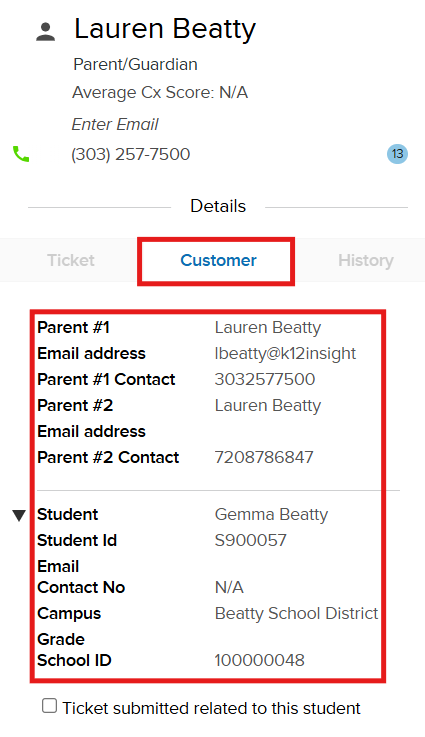
SIS Integrations can include the following:
- Parent Names & Contact Information
- Student Names
- Student Information
- Student ID Number
- School ID Number
- Campus Site
- Student Email
Adapt to Department
SIS integration with Onflo helps your district improve customer service across different departments in your district, including:
- Transportation - Include addresses, routes, and classifications
- Technology - Add device types, asset tags, work sites (for staff), and other relevant information
- Human Resources - Populate staff information, such as contact information and emergency contacts
How to Implement
We have two options for this integration:
- Option 1: Through a partnership with ClassLink, we can integrate via APIs. You will be able to add Onflo as a Roster Server Application in order to share the elected data in a OneRoster format.
Important note: We use parent contact information as the unique identifier for SIS integration. If parent/guardian data is not currently in your ClassLink setup, you will need to leverage Option 2.
- Option 2: If you use a different SIS provider (PowerSchool, Infinite Campus, Skyward, etc.), we will provide SFTP credentials for you to share the data on a regular sync cadence.
Considerations for SIS Integrations
- The customer profile is our own data, and if a call comes in and the customer profile is blank, we will do a one-time copy of the SIS data into the customer profile.
- The customer section will always display the latest SIS information.
- The customer profile will not automatically update if there's already data there. It needs to be manually updated.
- Information updated in our system (such as the customer profile) is not pushed to the SIS. This is due to restrictions SIS systems have in third-party systems changing their data.
Ready to set up your SIS integration? Click here to complete this brief intake survey, and a member of our implementation team will be in touch with next steps.