
Explore the latest productivity and user experience upgrades to the platform–including enhancements to Telephony, Chatbot, Ticket Management, and Account Management.
Onflo’s November release is all about efficiency, transparency, and experience. From live wait time announcements to smarter automation rules and bulk management tools, these updates give district teams more control and make it even easier for staff, students, and families to get answers quickly.
Telephony Enhancements
In-Queue Wait Time Announcement: You asked, we delivered. You can now enable a toggle in any queue to automatically announce estimated wait times to callers every 60 seconds.
Call Center Dashboard Redesign: The dashboard has a new look to improve visibility and navigation. Clickable options are now organized under top tabs, additional filtering by queue, topic, and number is now available, and real-time metrics like CSAT Score and Average Call Length now appear live.
Line Type Identifiers & Landline Pop-Up: Hovering over a phone number in a ticket now shows whether it’s a mobile number or landline. If it’s a landline, agents will receive a warning before closing the ticket, preventing text messages (feedback forms) from being sent to non-SMS numbers.
Call Note Templates: Users can create, save, and reuse note templates. Templates can be set as the default for a queue (auto-populates) or made available for agents to pull into their notes on demand.
Chatbot Updates
Voice Mode: Customers can now speak their questions instead of typing them for greater accessibility. After enabling Voice Mode in Chatbot Settings, a microphone icon appears in the chatbot to easily switch between modes.
Completeness Reports by Profile: Run reports across different chatbot profiles–ideal for districts supporting multiple profiles.
Domain-Wide Individual Site Rescan: From your Resource Center, you can now rescan individual pages without rescanning the entire domain–saving time when content changes.
Ticket Management
Tasks in (Non-ITSM) Tickets: Teams can now add tasks and manage multiple tasks per ticket, including naming, descriptions, and owners.
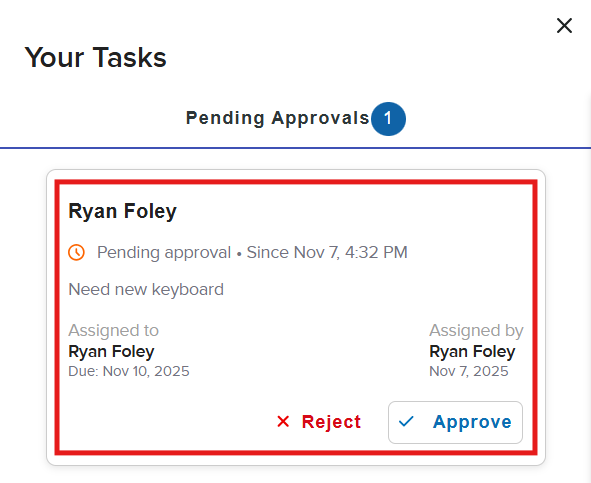
- Approval Tasks: Add approval tasks for specific individuals that must be completed before the ticket can be closed. Perfect for procurement requests.
- End-User Task View: End users can easily view their assigned tasks and pending approvals by hovering over the icon in the top right-hand corner.

Advanced Ticket Rules in Custom Forms: Enhanced logic within custom form ticket rules lets topic owners change the topic, assign ownership to a specific person, and manage or remove team members based on the answer selected in a multiple-choice or drop-down field.
Account Manager Improvements
Bulk Translate Success Messages: Select and translate multiple Success Messages (e.g., default messages) at once – no more updating them individually.
Bulk Edit/Delete in Topic Manager:
- Bulk Edit: Select multiple topics and bulk edit their Introduction Messages.
- Bulk Delete: Select and delete multiple topics at once.
Bulk Download Embed Codes: Within the Landing Page Tab Editor, you can bulk download embed codes for all landing pages as a single Excel file.
Ready to Dive In?
Onflo empowers your district to deliver exceptional customer service—all from one platform. If your district isn’t yet using these game-changing features to power your customer service, connect with your Client Success Manager to get started.
Stay up to date on the latest enhancements—catch up on previous Onflo updates.
As always, we value your feedback. If you have any questions, reach out to your Client Success Manager or our Client Care team.